
How AI Automation Can Completely Transform Your Workflow
Most people assume automation is only for large corporations with big tech budgets. But in 2026, that idea is completely outdated. AI automation has become accessible to teams of every size - and it is quietly reshaping how modern work actually gets done. If your days still feel packed with repetitive tasks, manual handoffs, and copy-paste routines, this guide is for you.
Why Traditional Workflows Are Holding You Back
Before AI entered the picture, workflow automation was rigid and rule-based. Systems would follow a fixed path - "if this, then that" - and the moment something unexpected happened, the whole process stalled.
The result? Teams spent enormous amounts of time managing processes instead of doing the actual work. Tasks like sorting emails, updating CRM records, generating reports, and routing requests between departments were all handled manually.
This created a hidden cost that most organizations never measured: the cost of human attention on low-value, repetitive work.
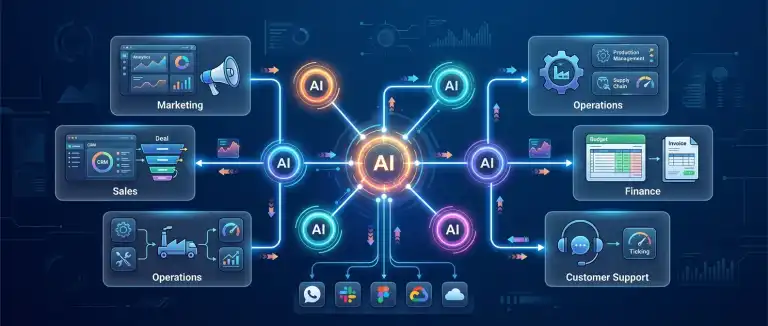 What Makes AI Automation Different
Modern AI automation is not just faster rule-following. It is genuinely intelligent decision-making built into your workflow. Here is what separates it from legacy automation:
- It handles unstructured data. AI can read an email, understand the intent behind it, and act - even if the format is inconsistent or unusual.
- It adapts to context. Rather than breaking when conditions change, AI workflows adjust based on what is actually happening.
- It works across tools. AI agents can connect your CRM, inbox, project management platform, and more - operating seamlessly between them.
- It learns from patterns. Over time, AI-powered workflows improve as they process more data and interactions.
Key Areas Where AI Automation Streamlines Workflows
The impact of AI automation is not limited to one department. It spans the entire organization. Here are the core areas where it makes the biggest difference:
1. Communication & Email Management
AI tools can monitor incoming messages, categorize them by priority, draft responses, and route inquiries to the right team member - all without human intervention.
2. Data Entry & CRM Hygiene
Manually updating contact records, logging interactions, and maintaining database accuracy is one of the most time-consuming tasks in sales and operations. AI handles this in the background, continuously and accurately.
3. Content & Report Generation
From weekly performance summaries to first drafts of documents, AI can pull data from multiple sources and assemble structured outputs that would otherwise take hours.
4. Customer Support Triage
AI can analyze incoming support tickets, determine urgency and topic, assign them to the right agents, and even suggest or draft initial responses - dramatically reducing response times.
5. Project Management & Task Routing
AI-powered workflows can monitor project progress, send automated reminders, reassign tasks based on workload, and flag bottlenecks before they become real delays.
The Real Benefit: Freeing Human Attention
There is a common concern that automation replaces people. In practice, what it replaces is the least fulfilling part of anyone's job.
When repetitive, low-judgment tasks are handled automatically, people can focus on strategy, creativity, relationship-building, and problem-solving. These are the things that drive real business value - and the things that no automation tool can replicate.
Teams that have adopted AI-driven workflows consistently report that their work feels more meaningful, not less. They spend more time on decisions that matter and far less time on administrative overhead.
No-Code Tools Are Making This Accessible to Everyone
You do not need an engineering team to get started with AI workflow automation. The 2026 landscape of tools is designed with accessibility in mind. Platforms like Zapier, Make, n8n, and Gumloop allow non-technical users to build sophisticated automated workflows through visual, drag-and-drop interfaces.
These tools connect to hundreds of popular apps - from Google Workspace to Slack to Salesforce - and embed AI reasoning directly into the automation logic. The barrier to entry has never been lower.
For teams with more complex needs, enterprise platforms like Workato and Vellum AI offer advanced orchestration, compliance controls, and the ability to handle massive data volumes at scale.
How to Think About Getting Started
The most effective approach is not to automate everything at once. Instead, follow a focused process:
- Identify your most repetitive tasks. Look for anything that is done the same way, more than once a week, that does not require deep human judgment.
- Map the inputs and outputs. What triggers the task? What is the expected result? This clarity is essential before building any workflow.
- Start small and iterate. Automate one workflow, measure the time saved, and then expand from there.
- Choose the right tool for your technical level. A no-code platform is often the best starting point, even for technical teams.
- Build in human checkpoints. For high-stakes decisions, keep a human in the loop. Automation should support judgment, not replace it entirely.
What to Look for in an AI Automation Solution
Not all AI automation platforms are built the same. When evaluating your options, consider these factors:
- Integration depth: Does it connect with the tools your team already uses?
- Scalability: Can it handle growing data volume and workflow complexity?
- Ease of use: How quickly can a non-technical team member build or adjust a workflow?
- AI capability: Does it go beyond simple rules to understand context and handle edge cases?
- Security & compliance: Especially important for enterprise environments or regulated industries.
Finding the Right AI Automation Approach for Your Needs
While the principles covered in this guide apply broadly, the right AI automation strategy depends heavily on your specific industry, team size, existing tech stack, and workflow complexity. What works for a small marketing team is very different from what a large operations department requires. Exploring specific tools, use cases, and implementation strategies relevant to your context is the most valuable next step.
AI automation is one of the most significant shifts in how knowledge work operates. Understanding the landscape - the tools available, the workflows they support, and the outcomes they make possible - is the foundation for making smart decisions. Whether you are just beginning to explore this space or looking to deepen an existing strategy, the resources available today make it easier than ever to find a path that fits your goals.